 WiseGoal
WiseGoal is coming soon to iPhone. This guide shows how the app works ahead of launch.
From a photo to your food journal
WiseGoal Plus can estimate calories and protein from a meal photo or read a nutrition label. The result opens as a draft for you to review. It becomes a meal in your journal only after you confirm it.
Meal photos and nutrition labels provide different information. A meal photo helps identify visible foods and portions. A label provides the printed nutrition for a stated serving. In either case, check that the amount matches what you ate.
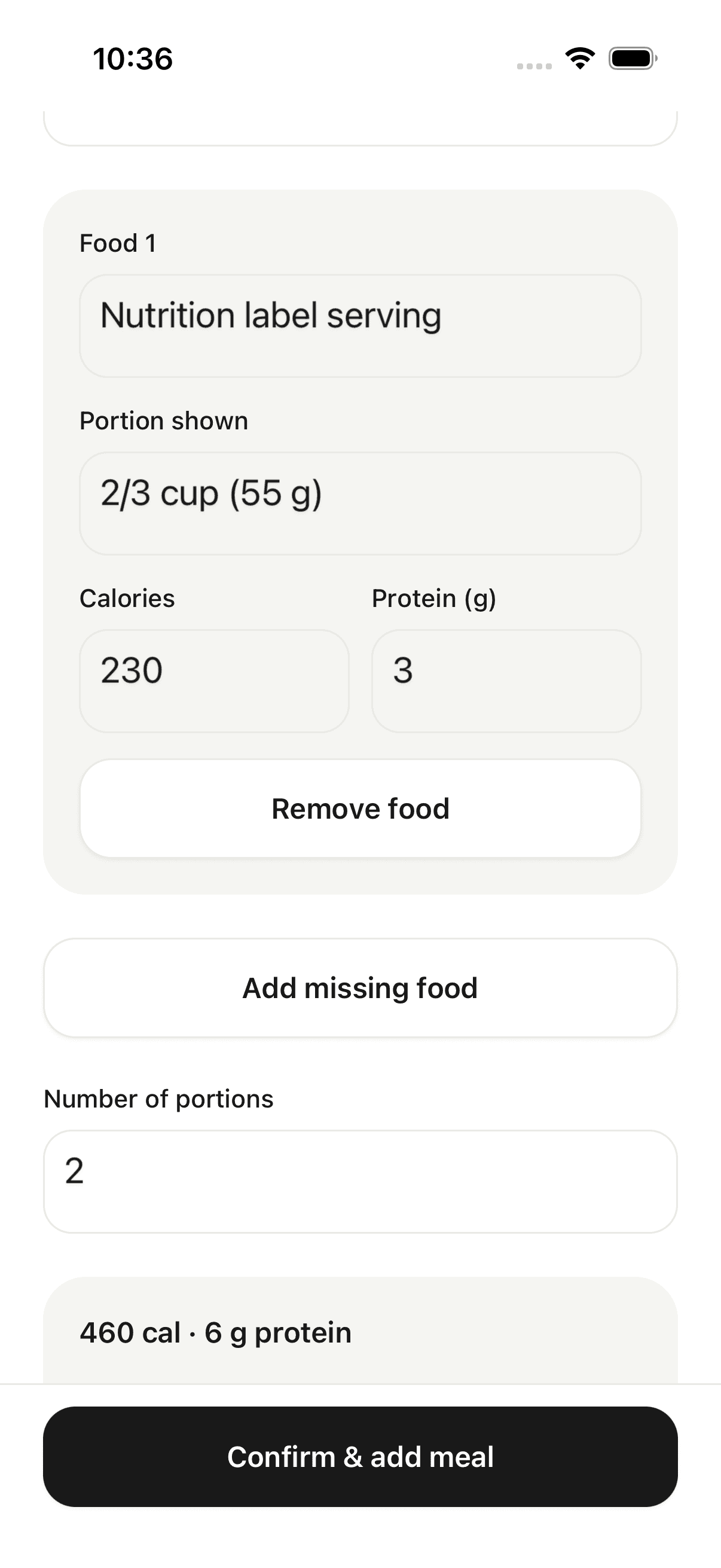
Review the foods and portions before saving
- Choose a meal photo or nutrition-label image from the food logging flow. Scans require Plus access and an internet connection.
- Review each returned food, its portion description, calories and protein. Add a missing food or remove one that does not belong.
- Correct the number of portions and check the updated total.
- Check the logging date, then choose Confirm & add meal.
In the example screenshot, the label serving contains 230 calories and 3 g protein. Setting the number of portions to two changes the meal total to 460 calories and 6 g protein. Your corrections affect the meal you save.
What a photo cannot tell you
A photo cannot reveal every ingredient, cooking oil or exact portion size. A visually plausible estimate can still be wrong. Review sauces, mixed dishes and serving sizes carefully; WiseGoal does not claim a universal accuracy percentage.
When the estimate does not reflect your meal, edit it or log the food manually. Manual entries, saved foods and repeated meals remain available without a subscription. See the Free and Plus comparison for access details.
Your photo and your choice
AI analysis requires sharing the selected image for processing, with the app’s consent flow. Progress-photo backup is a separate choice from food analysis. Read WiseGoal’s privacy policy for the information involved and your controls.
A food log is one part of your journal. The weight trends guide explains how recorded weight and weekly reviews fit alongside it.